
3D MCP Guide
Blender MCP vs Unity MCP vs Unreal MCP: A 3D MCP Guide
Compare Blender MCP, Unity MCP, Unreal MCP, and Mint MCP by setup, capabilities, architecture, and fit for browser-first 3D creation.

Architecture
Local editor control vs. a remote asset pipeline
Every option uses MCP, but the server connects the agent to a different source of truth.
Editor MCPs
Best when the live Blender, Unity, or Unreal project owns the state.
Mint MCP
Best when the coding project needs new, portable 3D assets.
What is a 3D MCP server?
A 3D MCP server is an integration that gives an AI agent structured tools for working with a 3D system. Instead of relying only on text instructions or editing project files blindly, the agent can discover named operations, pass typed inputs, and receive structured results.
The Model Context Protocol separates the AI application from the system it controls. The coding agent is the MCP host, the host creates an MCP client, and that client connects to an MCP server. The server might run inside a desktop editor, alongside it as a local process, or remotely as a hosted service.
That deployment choice is the central difference between the options in this guide:
- Blender MCP, Unity MCP, and Unreal MCP are editor-control integrations. They give an agent context about an installed application and let it act inside an open project.
- Mint MCP is a remote asset-pipeline integration. It lets an agent generate and retrieve 3D assets without requiring Blender, Unity, or Unreal Engine to be installed and running.
Neither architecture is automatically better for every job. The useful question is whether you want the agent to control an existing editor project or create assets that can move into a codebase, browser experience, or game pipeline.
3D MCP comparison
| 3D MCP | Deployment | Required 3D software | Primary job | Best fit |
|---|---|---|---|---|
| Blender MCP | Local MCP server plus Blender add-on | Blender | Inspect and manipulate a Blender scene | Artists and developers automating an active Blender file |
| Unity MCP | Local server integrated with Unity AI | Unity 6 | Read and modify a Unity project and Editor state | Teams already building inside Unity |
| Unreal MCP | Experimental local HTTP server embedded in Unreal Editor | Unreal Engine 5.8 | Drive Unreal Editor tools and project workflows | Teams already building inside Unreal |
| Mint MCP | Remote Streamable HTTP server with OAuth | No desktop 3D application | Generate, process, and retrieve 3D assets | Coding-agent and browser-first asset workflows |
The table compares workflow architecture, not identical features. Blender, Unity, and Unreal MCPs expose editor state. Mint MCP exposes a hosted creation pipeline. A team can use both: generate an asset with Mint, then use an editor MCP to place or modify that asset inside a larger project.
How Blender MCP works
“Blender MCP” most often refers to the popular third-party BlenderMCP project, not an official Blender Foundation product. Its architecture has two local parts:
- A Blender add-on opens a socket inside Blender.
- A Python MCP server connects the AI client to that add-on.
Once connected, the agent can inspect the current scene, create and modify objects, apply materials, adjust cameras and lighting, render images, and execute Blender Python. The project can also search external asset libraries and call supported model-generation services.
That direct editor access is Blender MCP's strength. If a mesh, material, camera, and collection already exist in a Blender file, an agent can reason about that live scene instead of reconstructing it from exported files.
The tradeoff is local setup. The user needs Blender, the add-on, the Python MCP process, a compatible AI client configuration, and a running connection between them. The leading implementation also exposes arbitrary Blender Python execution, so users should understand the trust and security implications before giving an agent access to important files or credentials.
Choose Blender MCP when: the job is primarily scene editing, procedural modeling, rendering, or Blender automation.
How Unity MCP works
Unity provides an official MCP server through the Unity AI ecosystem. According to Unity's MCP overview for game development, the server gives external agents access to actual project context such as the scene hierarchy, scripts, components, console state, and Editor operations.
That closes a common gap in coding-agent workflows. A coding agent can already read C# files from the repository, but ordinary file access does not tell it which GameObjects are active, which components are missing references, or what the Unity console reported after a domain reload. Unity MCP exposes that editor-only state as agent tools.
Typical uses include creating GameObjects, attaching scripts, inspecting the hierarchy, configuring scenes, reading console errors, and verifying a change in the Editor. Teams can also register custom C# tools for project-specific workflows.
Unity MCP still depends on a local Unity project and Editor session. It is not a general remote service for generating portable 3D assets outside Unity.
Choose Unity MCP when: the source of truth is a Unity project and the agent needs to understand or change its live Editor state.
How Unreal MCP works
Epic's official Unreal MCP documentation describes an experimental MCP server embedded in Unreal Editor 5.8. It exposes engine functionality through tools that can spawn actors, configure lighting, create material instances, inspect UI state, and run automation tests.
The server binds locally by default at http://127.0.0.1:8000/mcp. Unreal can generate client configuration for Codex, Claude Code, Cursor, Gemini, and VS Code, allowing those agents to connect from the project root.
Because Unreal's game and rendering state is highly threaded, Unreal MCP serializes tool calls onto the game thread. Epic also labels the integration experimental and notes that features, APIs, and data formats may change. Those constraints matter when designing long autonomous runs or team-wide automation around it.
Like Unity MCP, Unreal MCP is valuable because it can see state that does not exist in ordinary text files: actors in the level, Blueprint-backed behavior, Editor widgets, materials, lighting, and test results.
Choose Unreal MCP when: the job is primarily level, Blueprint, material, UI, or testing work inside an Unreal project.
How Mint MCP works
Mint MCP is a hosted 3D MCP server at https://mcp.mint.gg/mcp. A compatible coding agent connects over Streamable HTTP, the user authenticates with Mint through OAuth, and the server exposes tools for creating and retrieving assets.
Unlike an editor MCP, Mint does not require a desktop 3D application or a local MCP process. The 3D generation and post-processing work runs remotely. The agent can remain in the code project while it:
- creates 3D models from text or reference images;
- creates coherent asset packs and PBR materials;
- generates browser-viewable worlds;
- rigs and animates eligible humanoid models;
- optimizes or retopologizes supported generated models;
- waits for generation status and retrieves durable artifact manifests; and
- places returned GLB, animation, material, image, or audio artifacts into the project.
Mint publishes verified setup instructions for Codex, Claude, and Cursor. More generally, the endpoint can work with MCP clients that support authenticated remote Streamable HTTP servers. A client without remote MCP or OAuth support is not compatible merely because it is an AI coding tool.
The browser remains available as a handoff and review surface. Each generation can return a Mint link where the user can inspect progress, review an asset, or continue the conversation, while the coding agent keeps the asset identifier and artifact workflow in its own context.
Proof in practice
From generated assets to working 3D apps
The featured packs below show the portable source assets Mint can produce. The apps show the next step: a coding agent using those assets to build complete browser experiences.
Explore Asset Packs
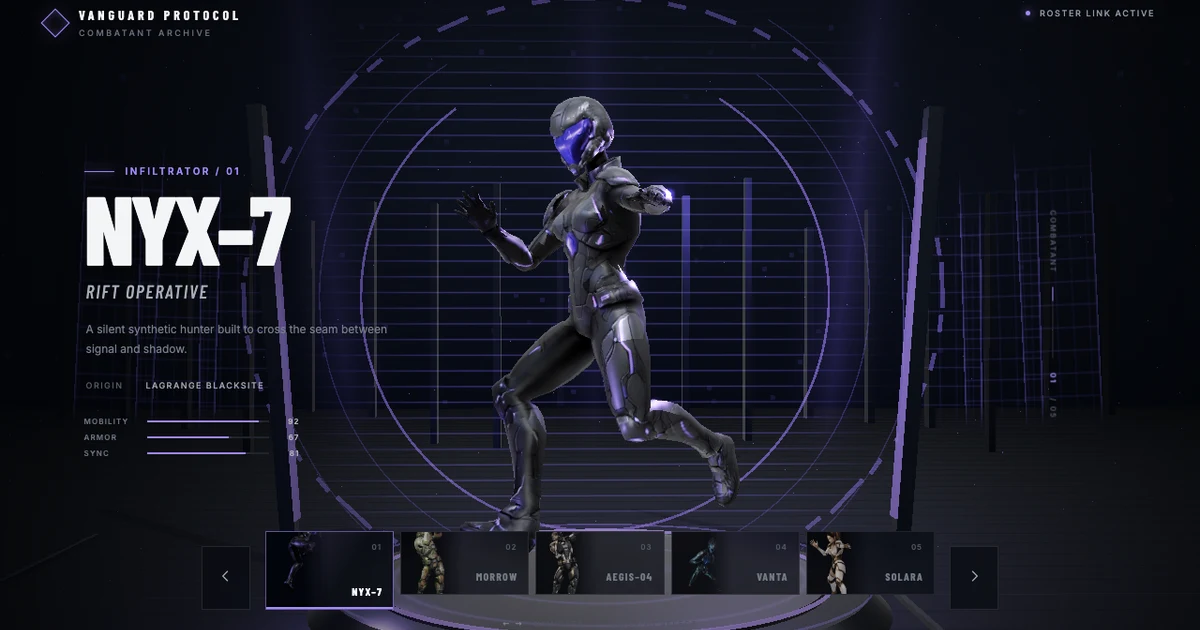
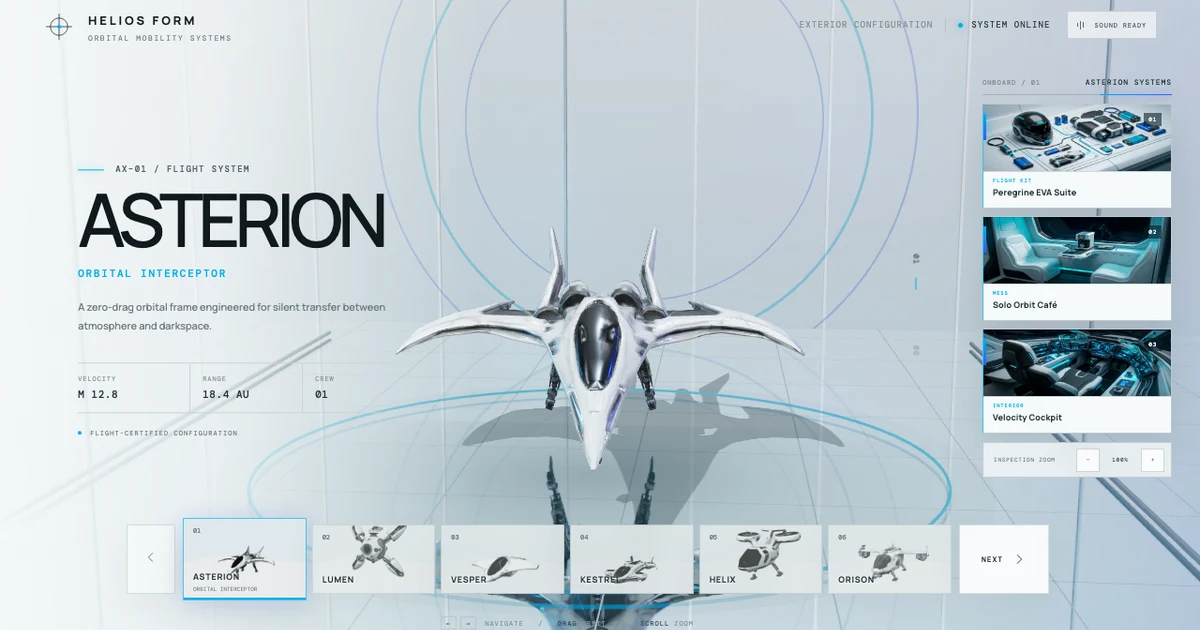
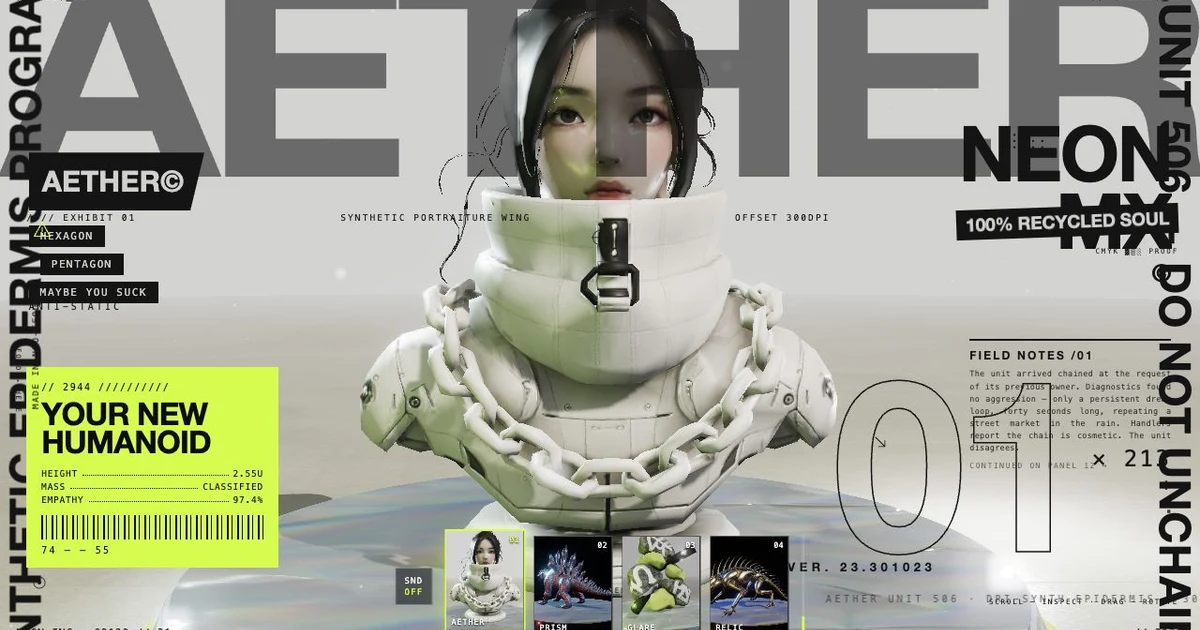

This is the browser-first argument in concrete form: Mint returns reusable artifacts, and the coding workflow can keep moving from generation to an interactive result without an installed 3D editor staying open.
Why Mint MCP is the best 3D MCP for browser-first creation
For browser-first asset generation, Mint MCP removes the largest setup dependency in the editor-control approach: there is no Blender, Unity, or Unreal installation to launch and keep connected.
That makes Mint a strong fit when the desired output is an asset for Three.js, React Three Fiber, a web configurator, a prototype, a game repository, or another coding-agent project. The agent can request the asset, wait for it, retrieve a durable download URL with a suggested project path and loader guidance, and continue implementing the experience.
The practical advantages are:
- One remote connection. The agent connects to an HTTPS MCP endpoint instead of coordinating a desktop editor, add-on, local server, and open project.
- Portable outputs. Finished assets are returned as artifacts that can be used outside Mint rather than remaining state inside one editor session.
- Web review. A generation has a browser handoff, so the user can inspect work without switching the coding workflow into a desktop DCC application.
- Agent continuity. Status, revisions, post-processing, and artifact retrieval stay in the same MCP conversation.
- Broader creation surface. The same connection covers models, worlds, asset packs, materials, animation, images, and audio.
Mint MCP is not a replacement for the detailed scene-editing tools in Blender or the live project context of Unity and Unreal. It is the better starting point when the bottleneck is creating and importing assets, especially for a browser experience.
Which 3D MCP should you use?
Use the system that owns the state you need to change:
- Use Blender MCP to manipulate geometry, materials, cameras, lighting, and renders in a Blender file.
- Use Unity MCP to inspect and modify a Unity scene, components, scripts, console, or play-mode workflow.
- Use Unreal MCP to drive actors, Blueprints, materials, UI, tests, and other Unreal Editor systems.
- Use Mint MCP to generate new 3D assets and bring them into a coding project without installing a desktop 3D editor.
These choices are composable. A browser game team might generate a prop pack with Mint MCP, integrate the GLBs through its coding agent, and later use Blender MCP for a detailed mesh edit. A Unity or Unreal team might use Mint to create source assets and the engine's MCP server to place, configure, and test them in the final project.
A browser-first Mint MCP workflow
The shortest Codex setup is:
codex mcp add mint --url https://mcp.mint.gg/mcp
After OAuth authentication, a useful first request is:
Use Mint MCP to create a coordinated six-item stylized forest campsite asset pack. Wait for the final assets, fetch the artifact manifests into this project, and build a responsive Three.js scene that displays them.
The agent can start the pack, follow each item's independent status, retrieve the ready artifacts, and use the returned loader guidance in the application. If visual review is important, ask for review mode explicitly so Mint pauses at previews before final generation.
The Mint MCP tool catalog documents the current read, generation, approval, derivative, status, and artifact tools. For complete browser applications, combine the server with Mint Three.js Skills so the coding agent also has guidance for scene architecture, interaction, asset loading, performance, QA, and release.
Frequently asked questions
Does Blender MCP require Blender?
Yes. The leading Blender MCP integration controls a running Blender application through an installed add-on and a local MCP process. It does not replace Blender itself.
Do Unity MCP and Unreal MCP work without their game engines?
No. Their main value comes from access to a live Unity or Unreal Editor project. The relevant engine and project must be installed locally.
Does Mint MCP require a 3D software download?
No desktop 3D application or local MCP server is required. You still need an MCP-compatible client such as a supported coding agent and a Mint account for OAuth authentication.
Does Mint MCP work with every coding agent?
Mint works with coding agents that support authenticated remote MCP servers. Mint currently publishes verified connection instructions for Codex, Claude, and Cursor. Other clients should be evaluated against their current remote MCP and OAuth support.
Can Mint MCP replace Blender, Unity, or Unreal MCP?
Mint replaces the need for those applications when the job is remote asset generation and artifact retrieval. It does not replace their specialized editor controls. Many production workflows benefit from using Mint for creation and an editor MCP for downstream scene integration.
What can Mint MCP create?
The current server supports workflows for 3D models, worlds, asset packs, PBR materials, eligible rigging and animation, images, and audio, along with supported optimization and retopology actions. Check the live tool catalog because the beta surface continues to evolve.
Try the remote 3D MCP
Connect your coding agent to Mint
Add the remote server, authenticate once, and ask your agent to create an asset for the project already open in your workspace.
codex mcp add mint --url https://mcp.mint.gg/mcp